Overview
How to use this page: each slide below shows the slide, the words to say, and what to stress. Timing chips show the window for that slide and where you should be on the 12-minute clock when you move on. The script is written in short sentences so you can read it naturally; small changes in wording are fine.
Please avoid presenting any user-study or questionnaire results. If asked, say: “User evaluation is ongoing.” All numbers on the slides come from the project documentation; please say them as written.
One-screen cheat sheet
| # | Clock | Slide | One thing to say |
|---|---|---|---|
| 1 | 0:00–0:55 | Title | Introduce PawAI: a Unitree Go2 Pro with an edge computer, depth camera and LiDAR. |
| 2 | 0:55–2:00 | Motivation & problem | The question: who has the final say when many modules want the robot to act? |
| 3 | 2:00–3:00 | Three challenges | 8 GB shared memory on one Jetson Orin Nano. |
| 4 | 3:00–3:55 | Hardware platform | Point to numbers 1–4 on the photo. |
| 5 | 3:55–5:05 | System architecture | Read the tiers top to bottom: remote GPU, cloud, edge, hardware. |
| 6 | 5:05–6:05 | Multimodal perception (Table 1) | Say the numbers exactly as on the slide (71.3 / ≈7.2 / ≈18.5 / ≈15 FPS). |
| 7 | 6:05–7:20 | Interaction Executive & safety arbitration | Core slide: take your time. |
| 8 | 7:20–8:20 | Event-to-action flow | One request = six logged steps. |
| 9 | 8:20–9:20 | Graceful degradation | Every cloud path has a local fallback (ASR, LLM, TTS). |
| 10 | 9:20–10:05 | Observability: PawAI Studio | The problem: data arrives but the robot does nothing — why? |
| 11 | 10:05–11:00 | Capability status (Table 3) | Honest table: 'code exists' ≠ 'capability validated'. |
| 12 | 11:00–12:00 | Conclusion & future work | Three contributions: edge perception, safety arbitration, robust + observable. |
Core message: The LLM only proposes. Only the Interaction Executive releases motion. If running late: shorten slides 6 and 9 to one sentence each.
Slide by slide
Slide 1 · Title
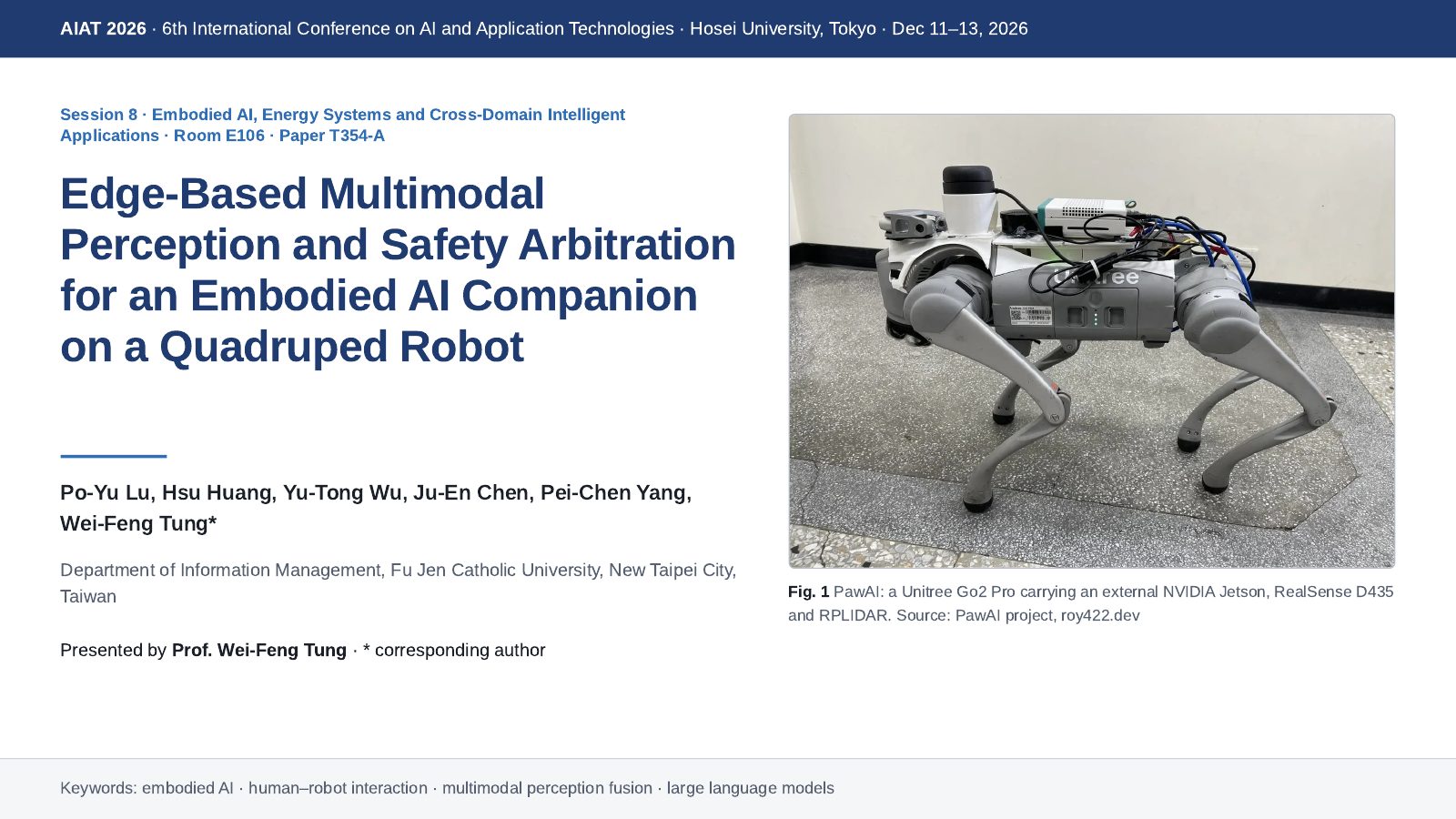
Good morning, everyone. Thank you for coming.
I am Wei-Feng Tung, from Fu Jen Catholic University in Taiwan.
This work was built with my students in the Department of Information Management.
Our title is "Edge-Based Multimodal Perception and Safety Arbitration for an Embodied AI Companion on a Quadruped Robot."
The robot in the photo is called PawAI.
It is a Unitree Go2 Pro robot dog. On its back we added an edge computer, a depth camera and a LiDAR.
Today I will show how it sees, how it decides, and how it knows when not to move.
- Introduce PawAI: a Unitree Go2 Pro with an edge computer, depth camera and LiDAR.
- Promise the three themes: sees, decides, knows when not to move.
Slide 2 · Motivation & problem
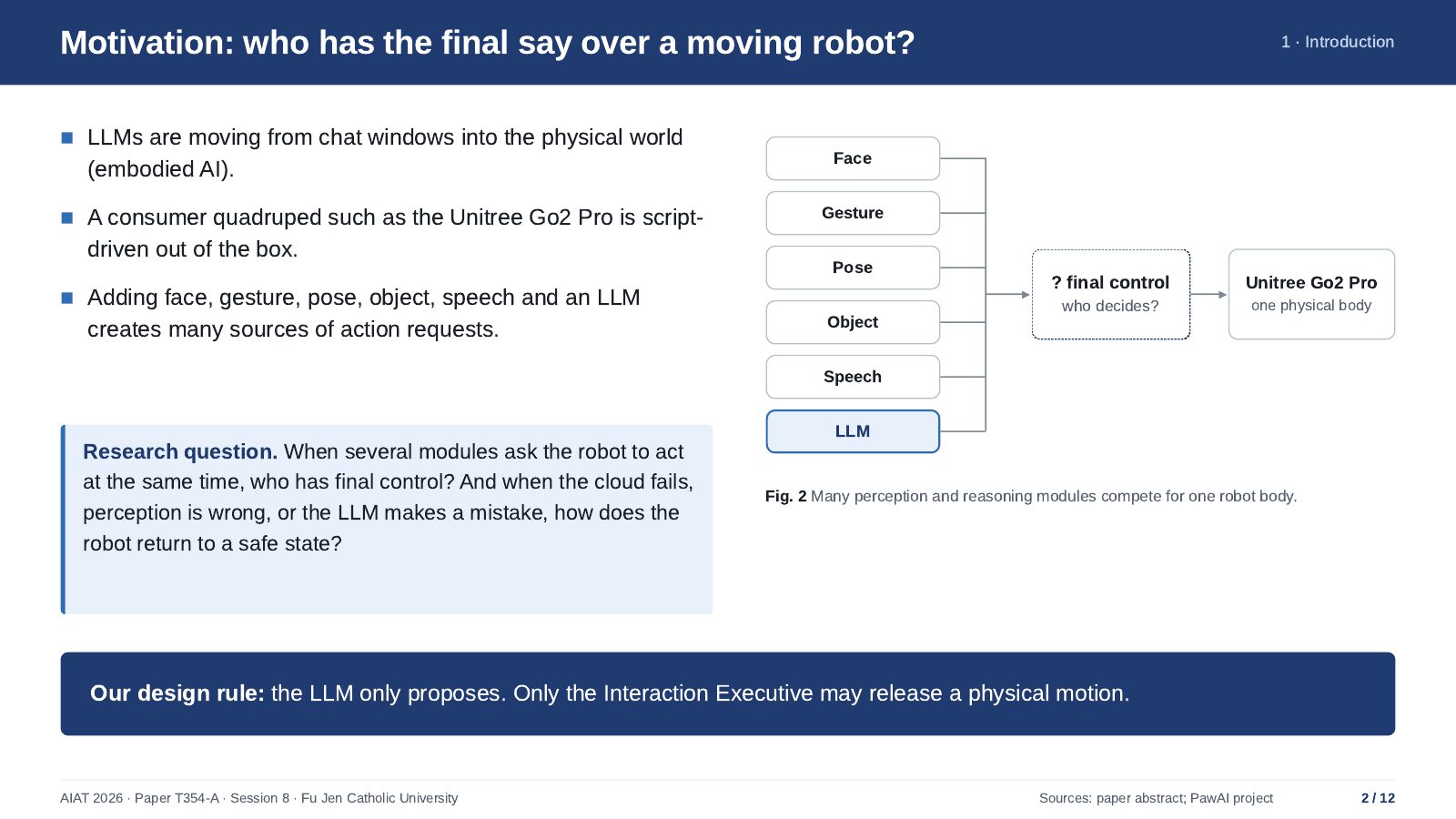
First, the motivation.
Large language models are leaving the chat window. They are moving into robots.
But a consumer robot dog is script-driven. It only plays ready-made actions.
When we add face, gesture, pose, object, speech and an LLM, many modules want the robot to act.
So our question is simple.
If two modules ask the robot to move at the same time, who has the final say?
And if the cloud fails, or the LLM is wrong, how does the robot return to a safe state?
Our design rule is at the bottom. The LLM can only propose. Only the Interaction Executive can release a motion.
- The question: who has the final say when many modules want the robot to act?
- Read the navy bar slowly: the LLM only proposes; only the Executive releases motion.
Slide 3 · Three challenges
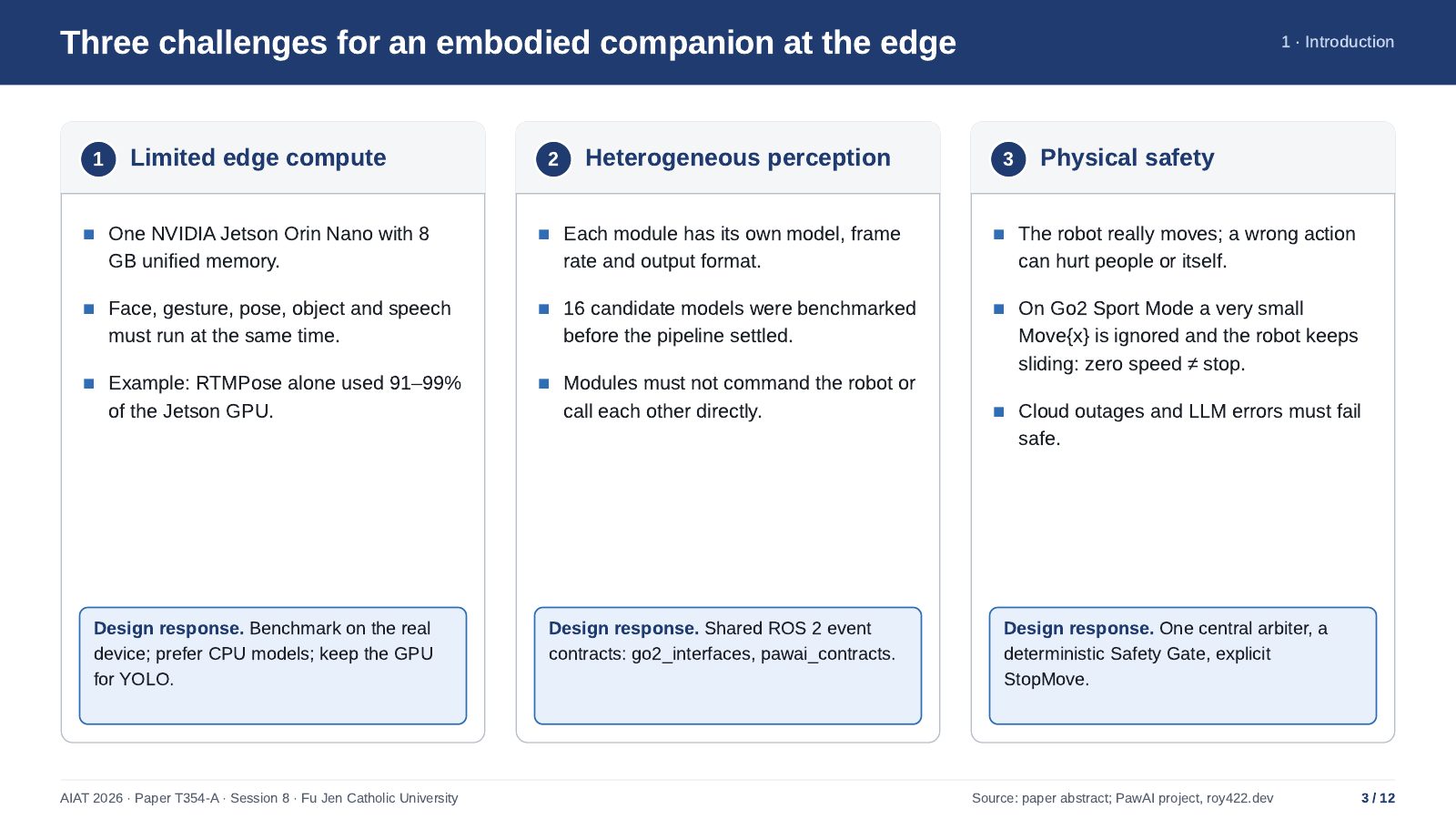
We faced three challenges.
One: limited compute. Everything runs on one Jetson Orin Nano with 8 gigabytes of shared memory. One pose model alone used 91 to 99 percent of the GPU. So we tested every model on the real device.
Two: very different perception modules. Each has its own model, speed and output. The team tested 16 models. Our answer is shared event contracts, so modules never call each other directly.
Three: physical safety. The robot really moves. One lesson: a speed of almost zero does not stop the Go2. It keeps sliding. So we use an explicit stop command and one central arbiter.
- 8 GB shared memory on one Jetson Orin Nano.
- Shared event contracts for very different modules.
- Zero speed is not stop: safety needs an explicit stop and one arbiter.
Slide 4 · Hardware platform
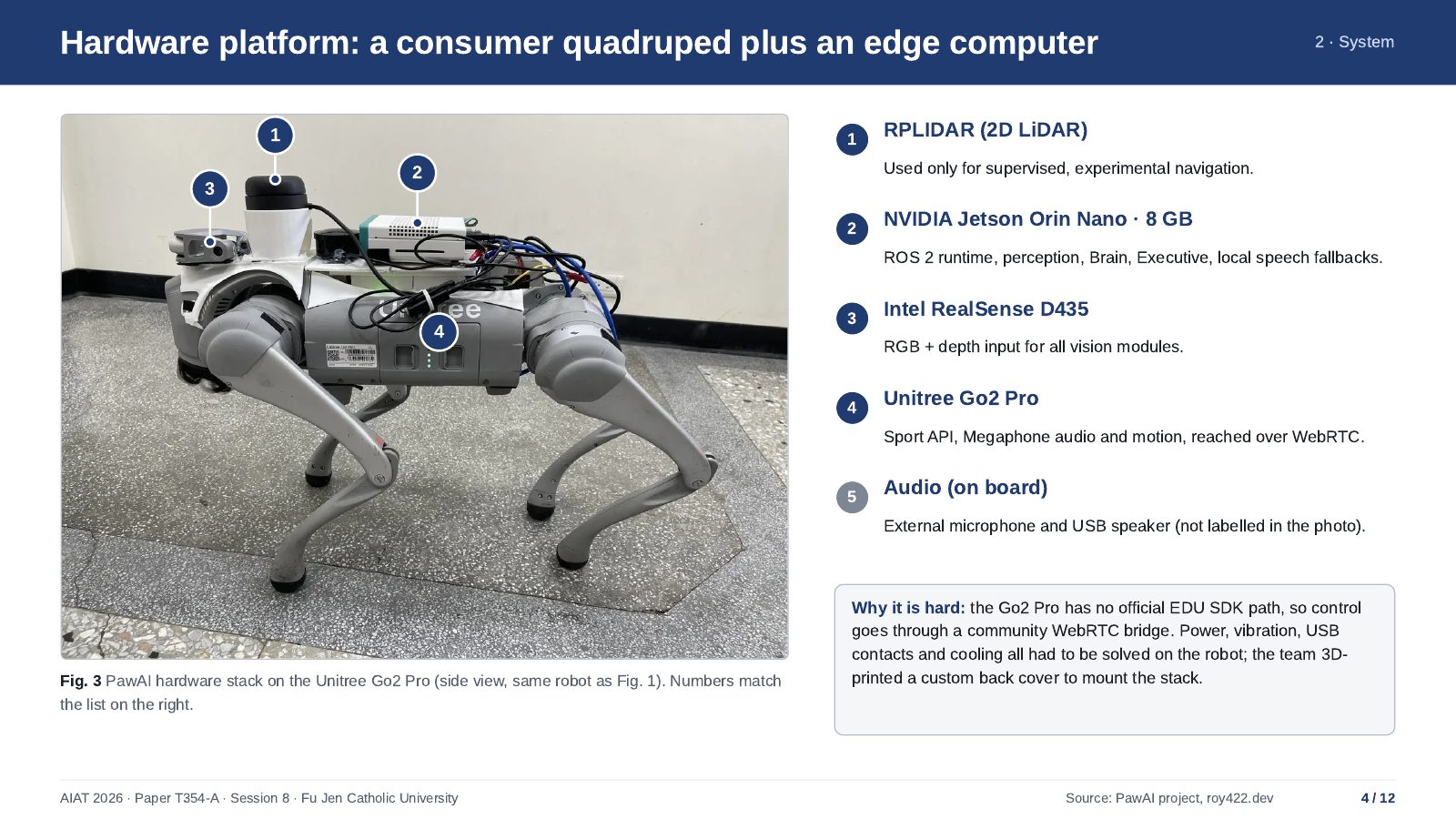
Here is the hardware, on the same robot as the cover photo.
Number one, on top, is the RPLIDAR. We use it only for supervised, experimental navigation.
Number two is the NVIDIA Jetson Orin Nano. It runs ROS 2, perception, the Brain and the Executive.
Number three, at the front, is the RealSense D435 depth camera.
Number four is the Unitree Go2 Pro. We control it over WebRTC.
Audio is an external microphone and a USB speaker.
The Go2 Pro has no official developer SDK, so this integration took real effort.
- Point to numbers 1–4 on the photo.
- Audio (5) is on board but not visible.
- Go2 Pro has no official developer SDK.
Slide 5 · System architecture
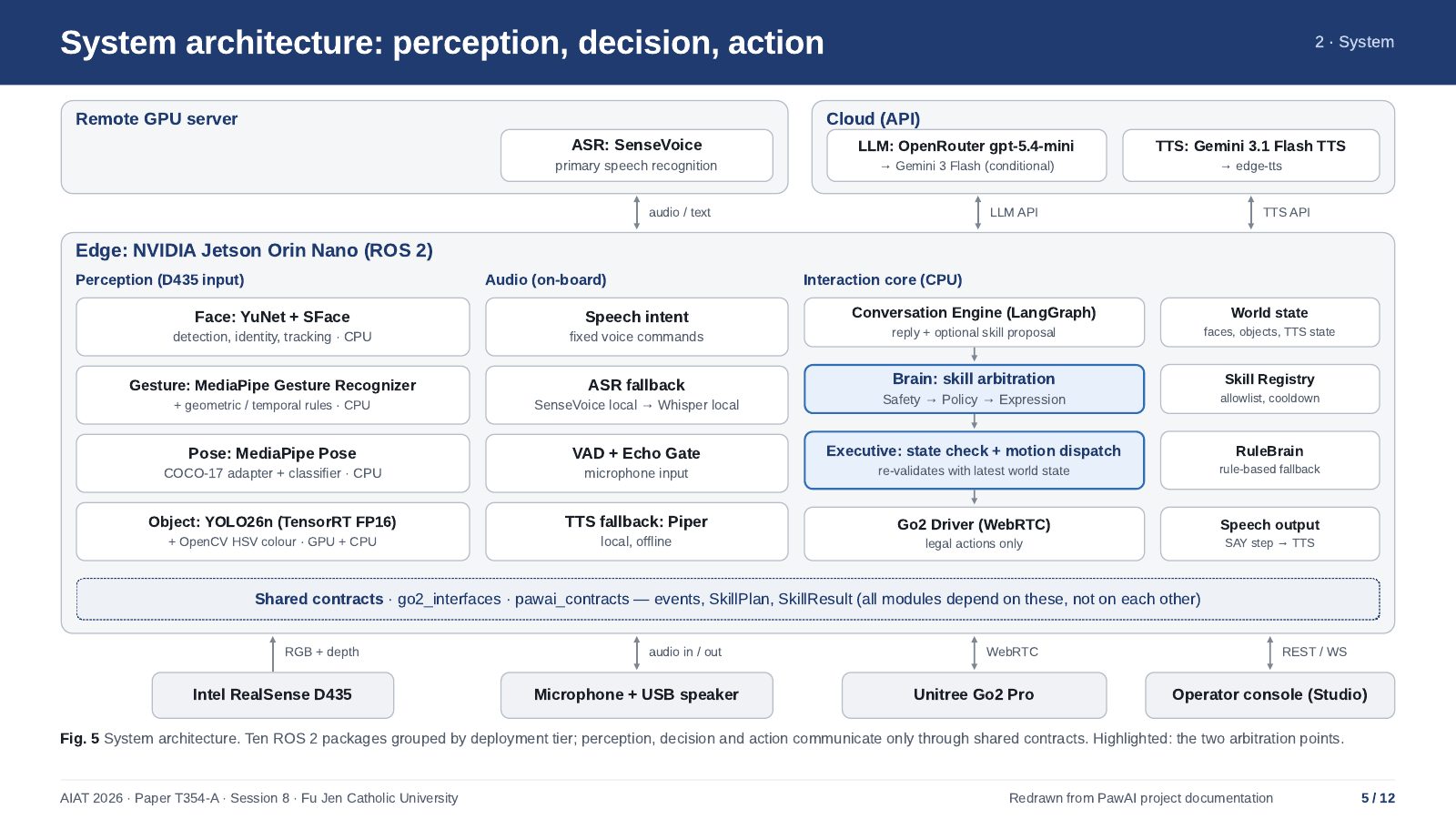
This is the system architecture. Please read it by tiers, from top to bottom.
At the top, a remote GPU server runs speech recognition. The cloud provides the LLM and high-quality speech output.
The big middle band is the Jetson, on the robot. It has three columns.
Left: perception. Face, gesture, pose and object, all from the D435 camera.
Middle: audio. Voice commands and local fallbacks.
Right: the interaction core. The Conversation Engine writes a reply and maybe a skill proposal. The Brain arbitrates skills. The Executive checks the state and dispatches motion. These two blue boxes are the key control points.
At the bottom are shared contracts. Every module depends on them, not on each other.
The last row is the hardware.
- Read the tiers top to bottom: remote GPU, cloud, edge, hardware.
- The two blue boxes (Brain, Executive) are the control points.
- Modules depend on shared contracts, not on each other.
Slide 6 · Multimodal perception (Table 1)
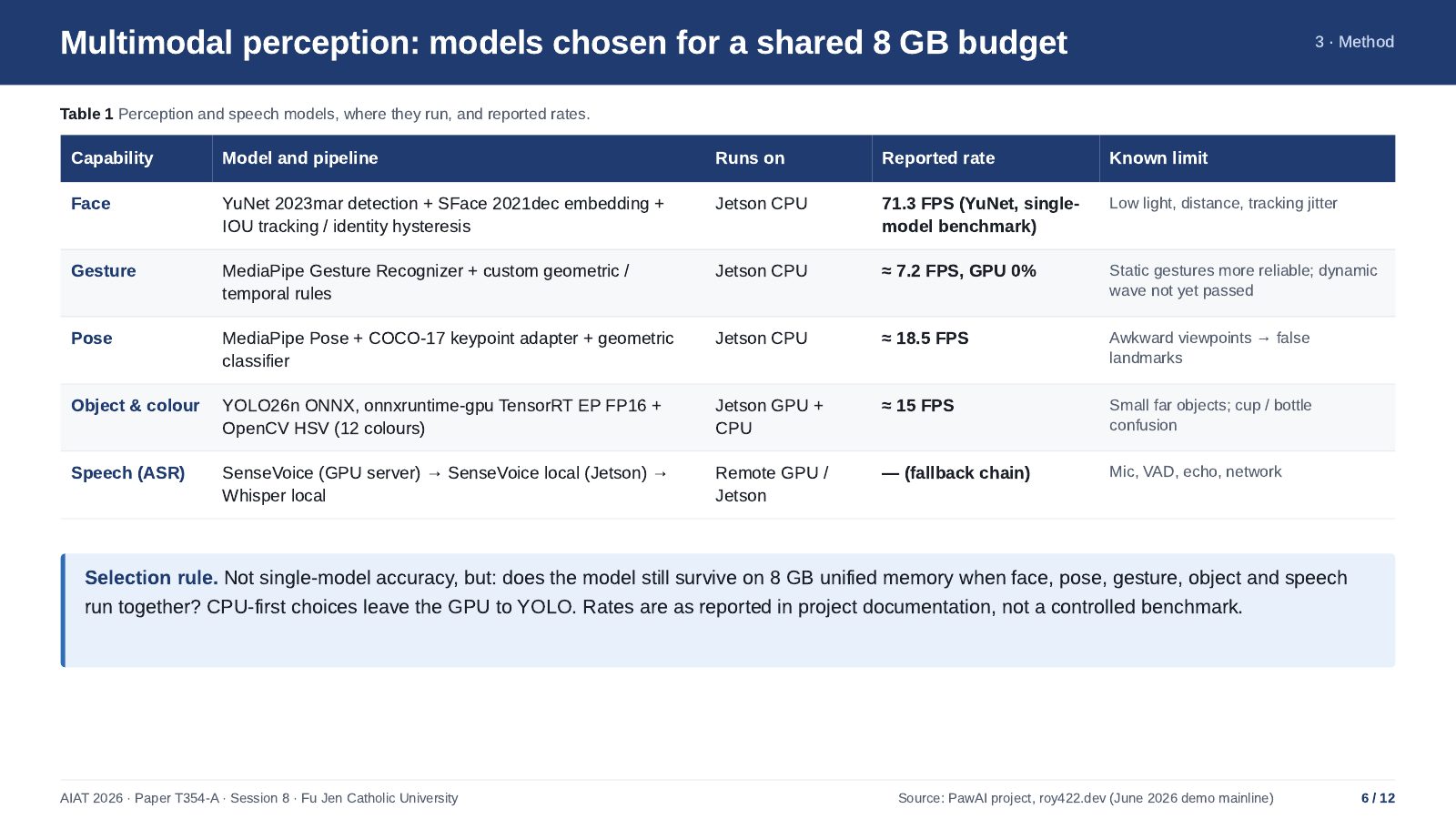
Table 1 shows the perception models, where they run, and the rates reported by the team.
Face uses YuNet and SFace on the CPU. The YuNet detector reached 71.3 frames per second in a single-model test.
Gesture runs at about 7.2 frames per second, with zero GPU use.
Pose runs at about 18.5.
Object detection uses YOLO26n with TensorRT, about 15 frames per second. It is the only GPU model.
Speech recognition is a fallback chain.
The key idea is in the blue box: we chose models that can run together on 8 gigabytes.
These rates are from project documentation, not a controlled benchmark.
- Say the numbers exactly as on the slide (71.3 / ≈7.2 / ≈18.5 / ≈15 FPS).
- Only YOLO uses the GPU.
- Rates are reported, not a controlled benchmark.
Slide 7 · Interaction Executive & safety arbitration
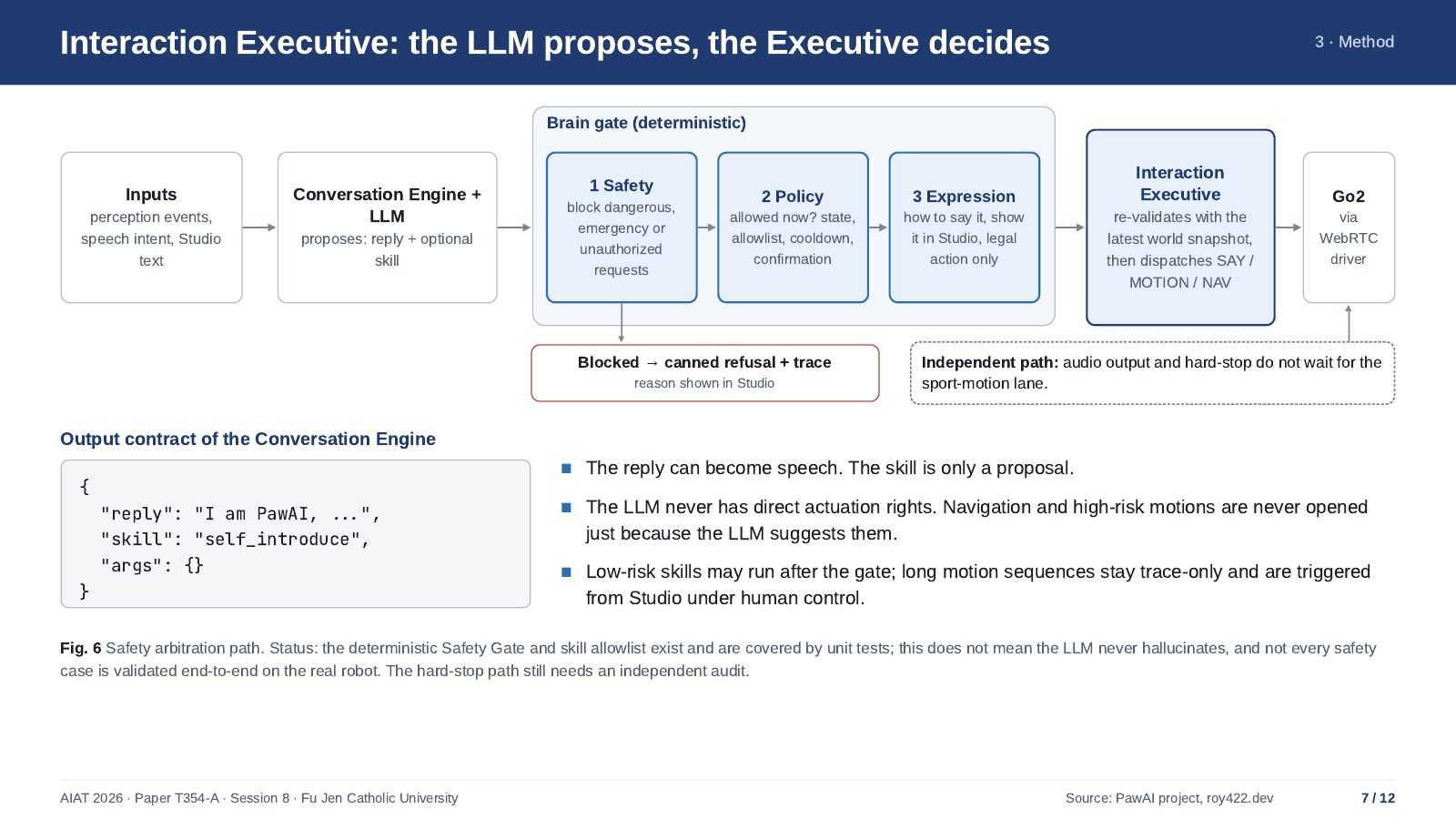
This is the core of the paper: safety arbitration.
Inputs come in on the left. The LLM makes a proposal: a reply, and maybe a skill.
The proposal passes three fixed layers.
Safety blocks dangerous or unauthorized requests.
Policy asks: is this skill allowed right now? It checks the state, the allowlist and the cooldown.
Expression decides how to say it and what to show.
Then the Interaction Executive checks the plan again with the newest world state. Only then does the Go2 move.
If a request is blocked, the robot politely refuses, and the reason is logged.
Audio and the hard-stop have their own path.
To be honest: the Safety Gate has unit tests, but not every case is tested on the real robot. The hard-stop still needs an independent audit.
- Core slide: take your time.
- Safety → Policy → Expression, then the Executive re-checks.
- Be honest: unit tests exist; hard-stop still needs an independent audit.
Slide 8 · Event-to-action flow
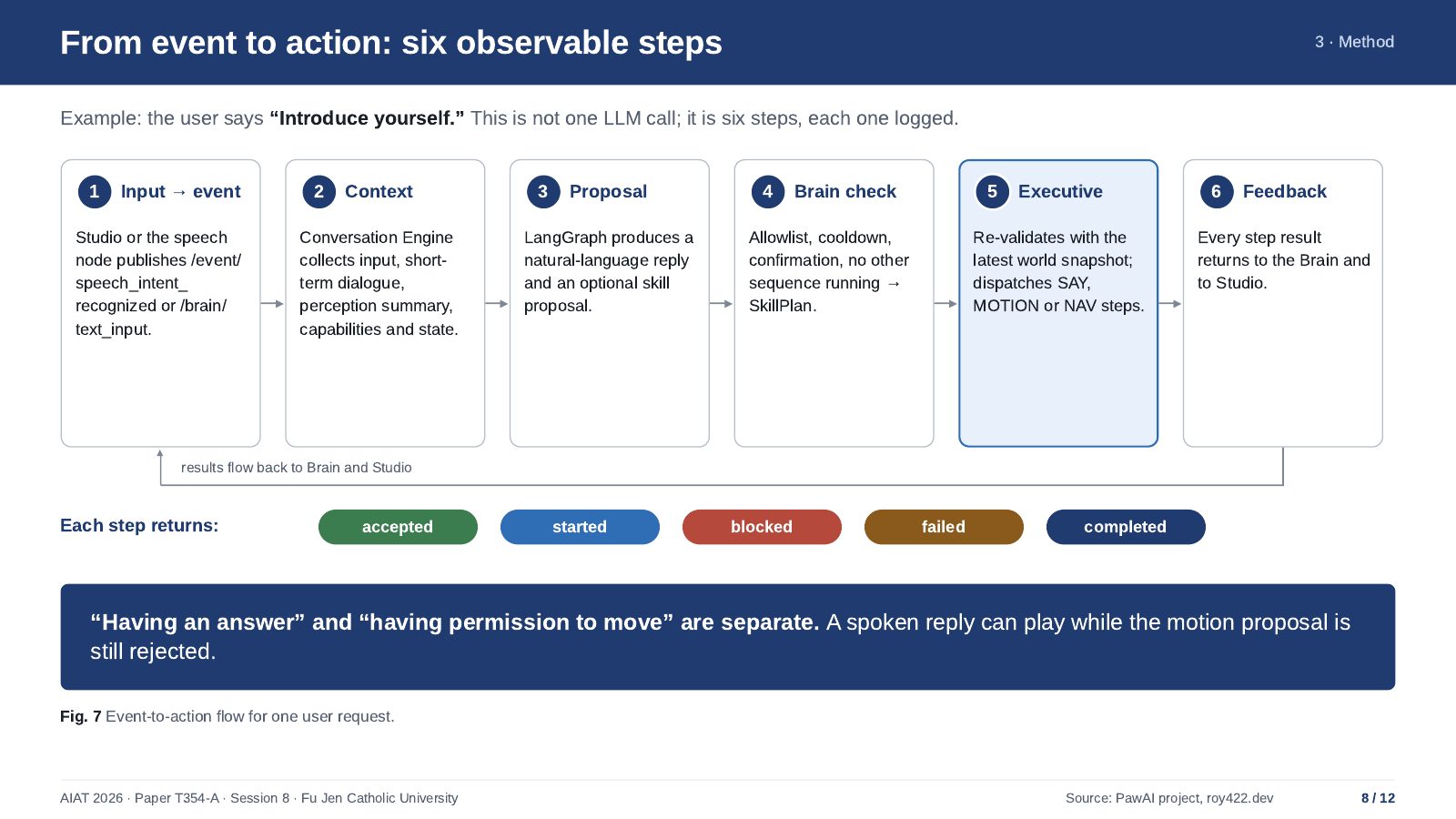
Here is one example. A user says, "Introduce yourself."
This is not one LLM call. It is six steps, and each step is logged.
One: the input becomes a ROS 2 event.
Two: the Conversation Engine collects context.
Three: LangGraph writes a reply and an optional skill proposal.
Four: the Brain checks the allowlist and cooldown, and makes a skill plan.
Five: the Executive checks again and runs the steps.
Six: every result goes back to the Brain and to Studio. It is accepted, started, blocked, failed, or completed.
The main message: having an answer is not the same as having permission to move.
- One request = six logged steps.
- Each step returns accepted / started / blocked / failed / completed.
- An answer is not permission to move.
Slide 9 · Graceful degradation
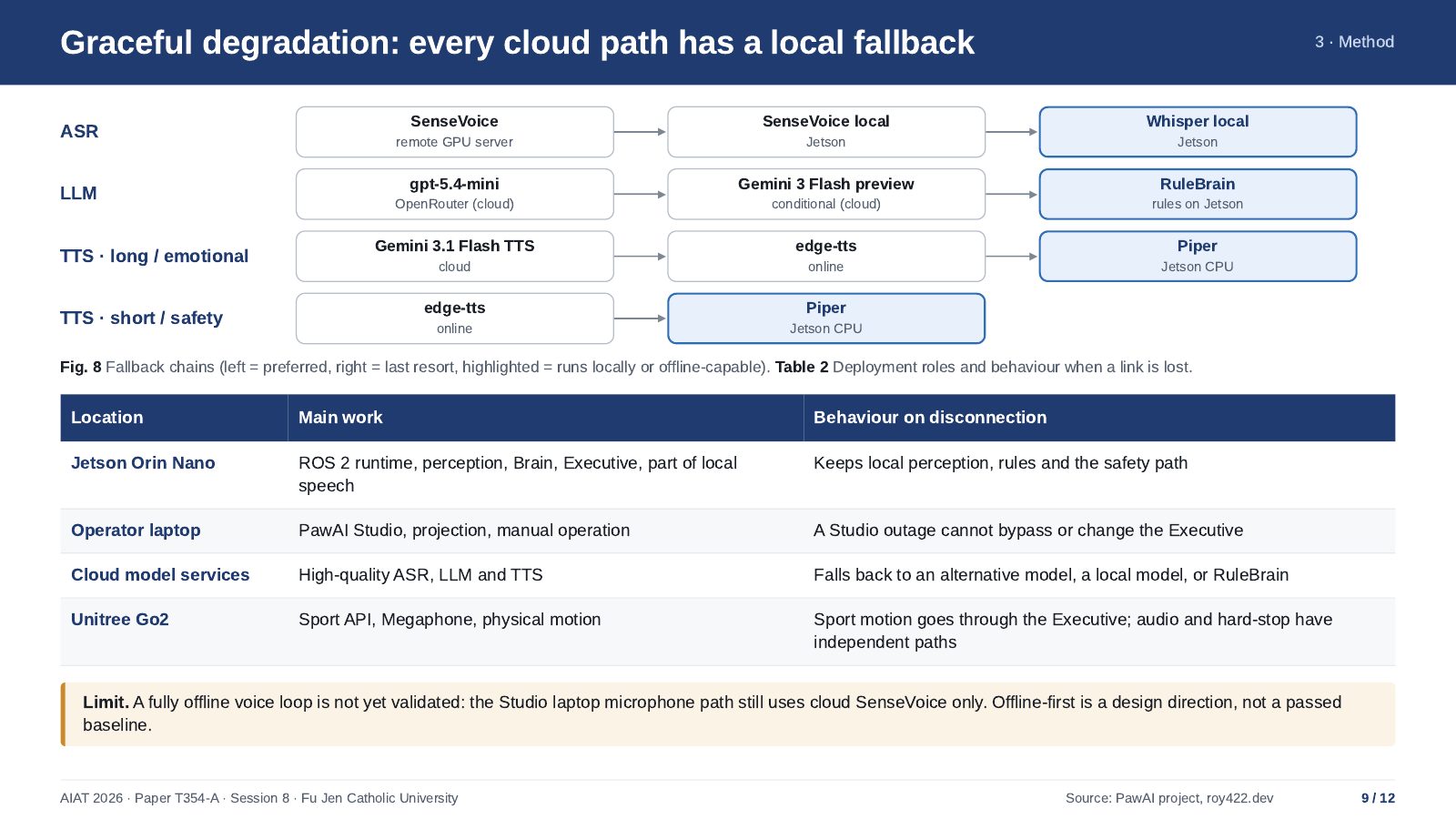
A home robot cannot depend on a perfect network. So every cloud path has a fallback.
Speech recognition falls back from the remote server to local models on the Jetson.
The LLM falls back to another model, and finally to RuleBrain, a simple rule-based fallback.
Speech output falls back to Piper, which runs locally.
Table 2 shows what happens when a link is lost. The Jetson keeps perception, rules and the safety path. If the Studio laptop disconnects, it cannot bypass the Executive.
One limit, in the orange box: a fully offline voice loop is not yet validated. Offline-first is our direction, not a finished result.
- Every cloud path has a local fallback (ASR, LLM, TTS).
- If Studio disconnects, it cannot bypass the Executive.
- Limit: full offline voice loop not yet validated.
Slide 10 · Observability: PawAI Studio
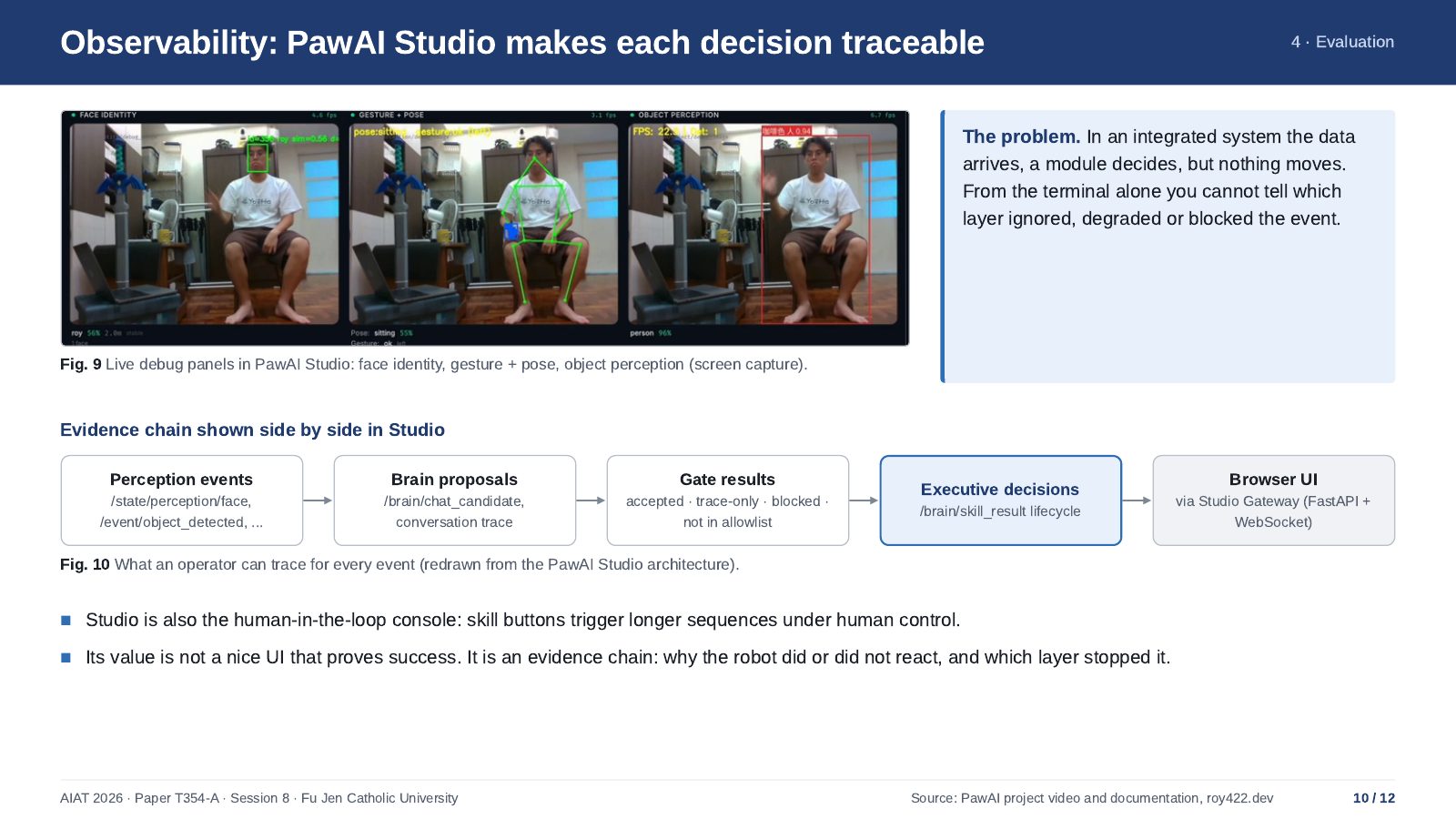
A common problem: data arrives, a module decides, but the robot does nothing. Why?
To answer this, the team built PawAI Studio.
The top image is a real Studio screen, with face, gesture, pose and object panels.
Below is the evidence chain. For every event, the operator sees the perception event, the Brain proposal, the gate result and the Executive decision.
So Studio tells us why the robot reacted or not, and which layer stopped it.
- The problem: data arrives but the robot does nothing — why?
- Studio shows the whole evidence chain side by side.
Slide 11 · Capability status (Table 3)
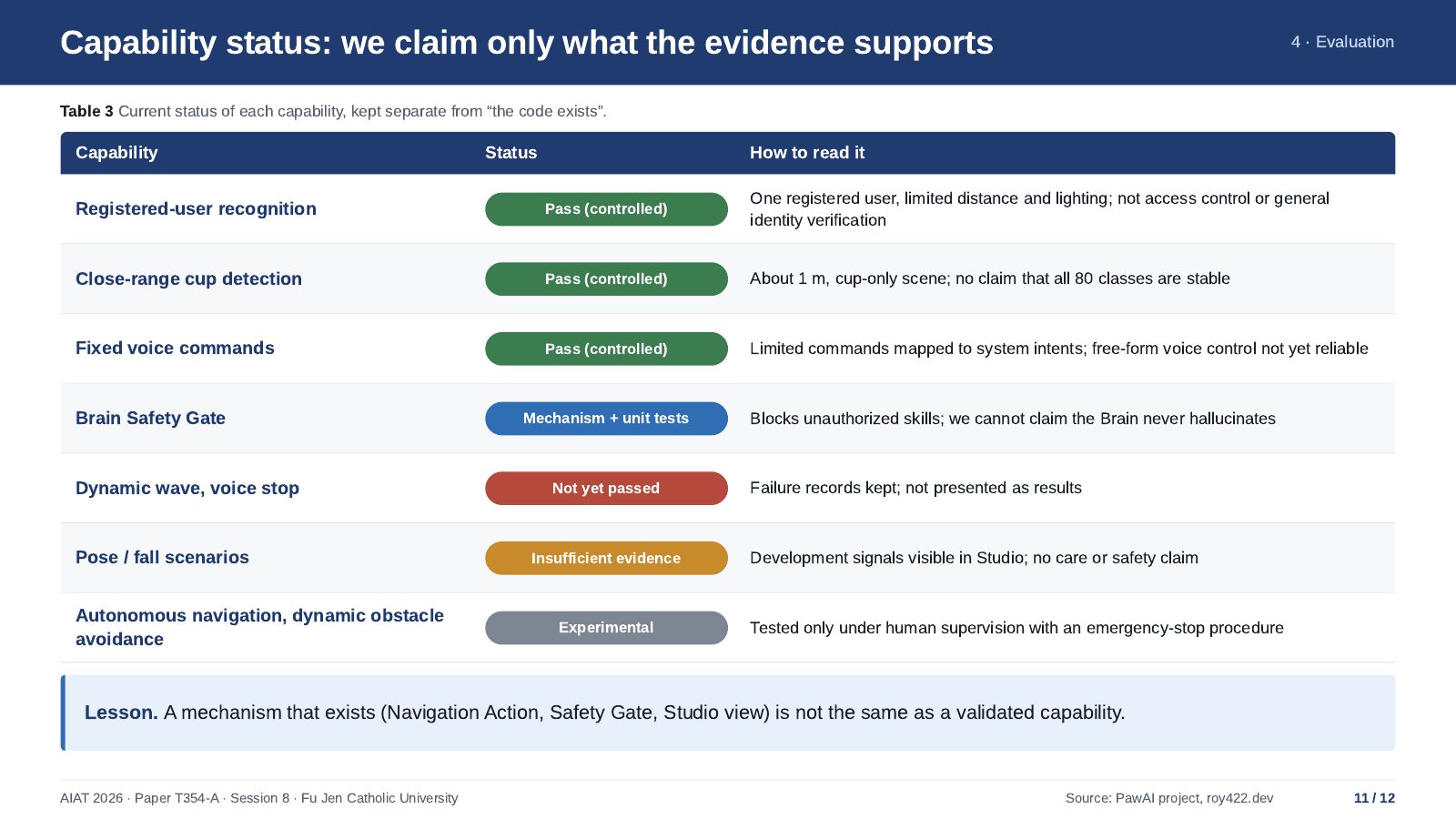
Table 3 is our honest status report. We separate "the code exists" from "the capability is validated."
Three capabilities passed under controlled conditions: recognizing one registered user, detecting a cup at about one meter, and fixed voice commands.
The Brain Safety Gate passes its mechanism and unit tests.
Dynamic waving and voice stop have not passed yet.
Pose and fall scenarios do not have enough evidence, so we make no care claim.
Navigation is still experimental, tested only with a person watching and an emergency stop ready.
The lesson: a mechanism that exists is not a validated capability.
- Honest table: 'code exists' ≠ 'capability validated'.
- Three passed under controlled conditions; wave and voice stop not yet.
- No care claim for falls; navigation is experimental.
Slide 12 · Conclusion & future work
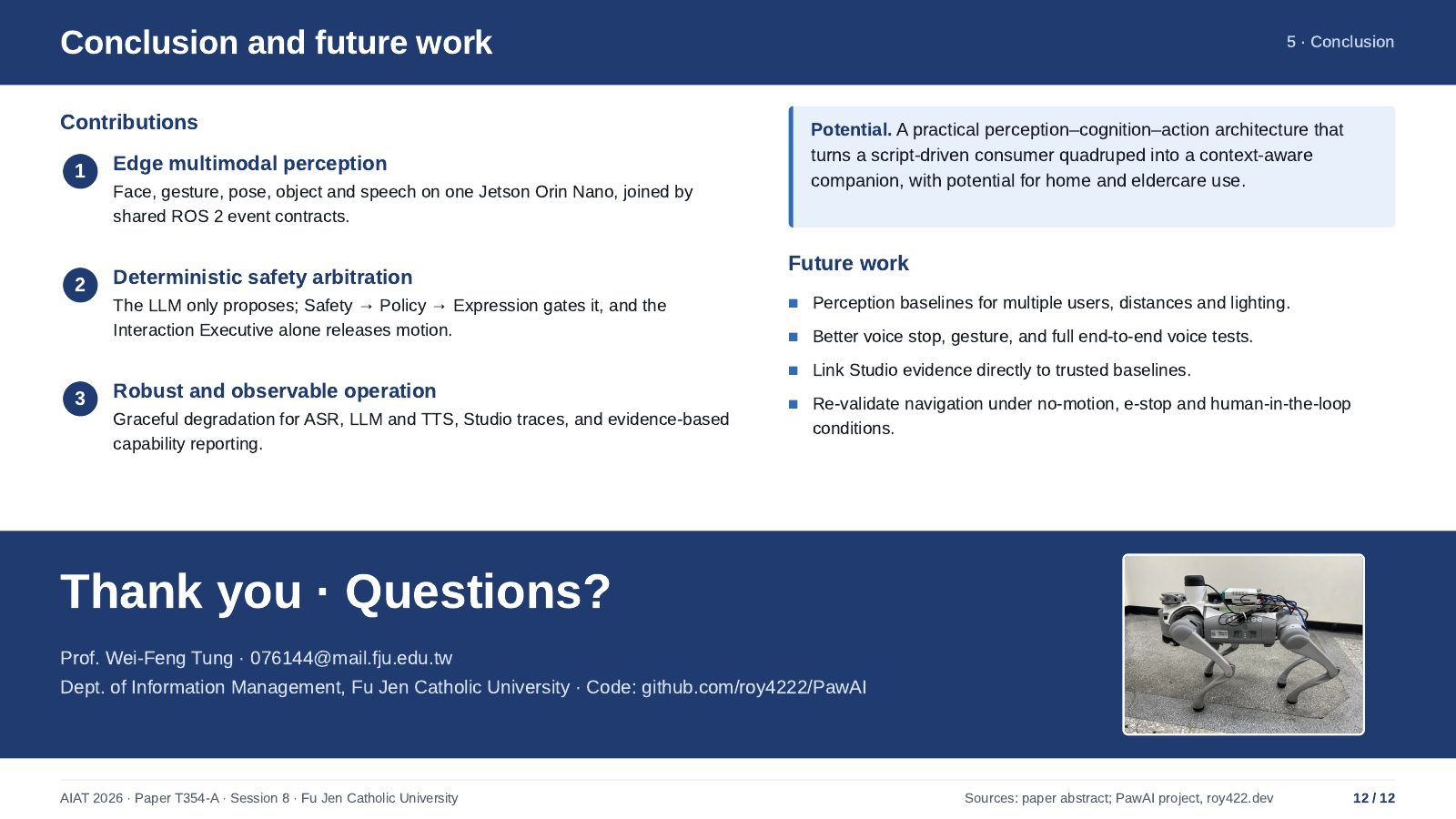
To conclude, three contributions.
One: multimodal perception on a single edge computer, linked by shared event contracts.
Two: deterministic safety arbitration. The LLM proposes. Only the Executive releases motion.
Three: robust and observable operation, with fallbacks, Studio traces and honest reporting.
We see potential for home and eldercare companions.
Next, we will build baselines for more users, distances and lighting, improve voice stop and gesture tests, and re-validate navigation with a human in the loop.
Thank you very much. I am happy to take your questions.
- Three contributions: edge perception, safety arbitration, robust + observable.
- Potential for home and eldercare.
- Then invite questions.
Anticipated questions (≈3 min)
If a question goes beyond these: “That is a good point. The student team has the details. I am happy to follow up by email.”
1. Did you evaluate the system with users? What were the results?
User evaluation is ongoing. The questionnaire covers anthropomorphism, animacy, likeability, perceived intelligence, safety, overall acceptance, and trust. We will report the results in a later paper. Today we focus on the architecture and its current technical status.
2. Why not let the LLM control the robot directly? It would be simpler.
Because the robot really moves. An LLM can produce wrong content. In our design the LLM only proposes a reply and a skill. Deterministic Safety, Policy and Expression layers check it. Then the Interaction Executive checks again with the latest world state. Only the Executive can release a motion.
3. How do you know the safety gate works?
The Safety Gate and the skill allowlist exist and have unit tests. That is all we claim. It does not mean the LLM never makes mistakes, and not every safety case has been validated end-to-end on the real robot. The hard-stop path still needs an independent audit.
4. What happens when the network or the cloud goes down?
Every cloud path has a fallback. Speech recognition falls back to local SenseVoice and then Whisper on the Jetson. The LLM falls back to another model and then to RuleBrain, a rule-based fallback. Speech output falls back to Piper, which runs locally. Perception, rules and the safety path stay on the Jetson. One limit: a fully offline voice loop is not yet validated.
5. Why MediaPipe and YuNet on the CPU instead of stronger GPU models?
Everything shares 8 GB of unified memory on one Jetson Orin Nano. One pose model, RTMPose, used 91 to 99 percent of the GPU by itself. So we chose CPU models that can run together, and we keep the GPU for YOLO object detection.
6. How fast is the system? What is the end-to-end latency?
Per-module rates are reported in Table 1: YuNet 71.3 FPS in a single-model benchmark, gesture about 7.2 FPS, pose about 18.5 FPS, object about 15 FPS. We do not report a controlled end-to-end latency in this work; speech latency still depends on the microphone, echo and network.
7. What if two modules ask the robot to act at the same time?
That is exactly the arbitration problem. Perception modules never command the robot. They only publish events. The Brain checks the allowlist, cooldown, confirmation and whether another sequence is already running. The Executive is the single arbiter for sport motion.
8. Can it detect falls for eldercare?
Not yet. Pose and fall scenarios have insufficient evidence. We show development signals in Studio, but we make no care or safety claim. Eldercare is a potential application, not a current capability.
9. Does the robot navigate autonomously?
Navigation is experimental. We test it only under human supervision, with an emergency-stop procedure. We do not claim full autonomous navigation. Re-validating navigation is part of our future work.
10. Why the Unitree Go2 Pro, and can others reproduce this?
It is a consumer quadruped, which makes the problem realistic: it has no official developer SDK path, so we use a community WebRTC bridge. The code and documentation are public at github.com/roy4222/PawAI. It is a research prototype, not a finished product.